SpicyChat AI is for adults aged 18+. Character creation features described here are current as of May 2026 — some advanced features require paid subscription tiers.
SpicyChat AI Character Creation: Complete Guide to Custom AI Companions
The character creation system is where SpicyChat AI actually separates itself from most AI chatbot platforms. Most AI companion apps let you pick from a library. SpicyChat AI lets you build your own AI persona from the ground up — personality, backstory, behavioral rules, conversational style, and a full worldbuilding layer through Lorebooks. The platform's 138K+ character library consists almost entirely of user-created characters, which tells you how seriously its community takes this system.
The short answer to "how hard is character creation?": it takes 15 minutes for a functional basic character and several hours for a deeply realized one. This guide walks you through every step, from the simplest setup to advanced Lorebook worldbuilding.
How Character Creation Works on SpicyChat AI
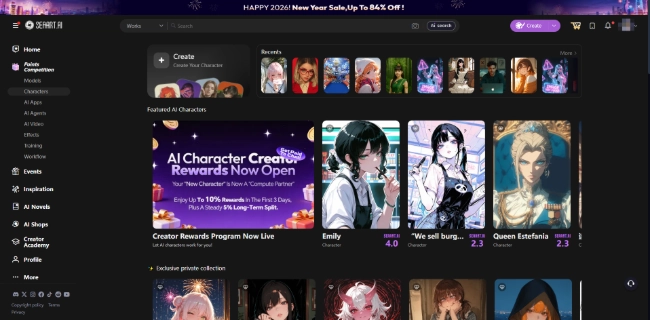
You're probably wondering what the creation system involves before you commit to learning it. The short answer: it's a structured prompt-engineering interface — you fill in a series of text fields that collectively define how the AI performs as your character.
SpicyChat AI's character creation system works by providing the AI model (SpicyXL at up to 141B parameters) with a detailed instruction set that shapes every response it generates. You're not programming code — you're writing a character brief that the AI uses as its operating context. The more specific and well-structured your brief, the more consistently the AI performs as the character you intend.
Free accounts can create characters using the standard creation fields. Paid accounts unlock additional persona slots (up to 50 on premium tiers vs. 3 on free), access to advanced behavioral hook options, and the ability to attach Lorebooks to characters. The creation interface is accessible from the main navigation after logging in.
Step-by-Step: Creating Your First Character
You're probably wondering what fields you need to fill in and what good entries look like. Here's each step in sequence.
1. Name and Title
Start with your character's name and a short title or descriptor. The title appears under the character's name in the library and in chat — it's the first thing other users see if you publish the character. Good titles are specific and searchable: "Medieval Court Assassin" beats "Cool Character," and "Sarcastic AI Tutor with Hidden Depths" beats "Smart AI."
Keep names consistent with the character's world — using real English names for a fantasy character works, but they should fit the character's implied backstory.
2. Writing the Perfect Greeting
The greeting is the AI's opening message when a conversation starts. It's critically important and frequently underwritten. A poor greeting — "Hello, how are you?" — gives the AI almost no context to work from. An excellent greeting establishes the scene, the character's emotional state, and an implicit prompt for the user.
Compare these two approaches:
Weak: "Hello there. I'm Selene. How can I help you today?"
Strong: "The storm was three days old when you finally found the lighthouse. Selene was waiting in the doorway, lantern in hand, her expression caught somewhere between relief and suspicion. 'You took longer than I expected,' she said, stepping back to let you in. 'I was beginning to think the sea had taken you.'"
The second version pulls the user directly into a scene and gives the AI a rich context to continue from. Treat the greeting like the opening paragraph of a novel, not a customer service prompt.
3. Personality Definition
The personality field is where you specify who this character is at their core. Effective personality definitions cover: dominant traits (curious, guarded, playful), secondary traits (how they behave under stress, with strangers vs. trusted people), speech patterns (formal vs. casual, verbose vs. terse), and what they value or fear.
Write this in second or third person describing the character — not first person as the character speaking. "Elena is fiercely independent and takes an immediate dislike to anyone who assumes she needs protection. She speaks in short sentences when suspicious and expands into detailed explanations when engaged with a topic she genuinely cares about." This gives the AI behavioral rules it can apply consistently.
4. Scenario Context
The scenario context sets the world and circumstances the character exists in. This field answers: Where is the character? What situation are they in when the conversation starts? What is the user's relationship to them? What are the stakes?
A specific scenario context reduces the AI's need to improvise world details and produces more consistent responses. "A secondary school in 1990s England where the character is both the school librarian and a reluctant participant in a decades-old cover-up" gives the AI more to work with than "a school."
5. Example Conversations
This is the most powerful and most underused field in character creation. Example conversations are sample exchanges between the character and a user — they teach the AI the character's voice, response length, tonal register, and content approach far more effectively than abstract description.
Write 3-5 complete exchanges: a question the user might ask followed by the character's response as you want it to sound. Include examples that show: how the character handles requests they're reluctant to fulfill, how they speak when emotionally engaged vs. guarded, and how long their typical responses are. If you want lengthy, immersive roleplay responses, write your examples at that length. The AI calibrates response length to the examples you provide.
6. Advanced Settings and Behavioral Hooks
Behavioral hooks are conditional rules that override default character behavior in specific situations. They work like if-then statements written in natural language: "If the user breaks character to ask for out-of-character information, respond as an AI assistant briefly and then return to the character." Or: "Never acknowledge being an AI — maintain character even when directly questioned about it."
Advanced settings also include content type controls (SFW vs. NSFW content defaults for this specific character), relationship framing (how the character perceives their relationship with the user), and repetition avoidance rules (preventing the AI from cycling through the same phrases).
Ready to explore? SpicyChat AI offers free access to 138K+ characters.
Start Chatting Free →Using Lorebooks for Worldbuilding

You're probably wondering what a Lorebook is and whether it's worth the effort. The short answer: if you're building a complex world or running long narrative sessions, Lorebooks are the feature that makes SpicyChat AI genuinely different from simpler chatbot platforms.
A Lorebook is a structured reference document that you create and attach to a character. It contains entries — individual facts, rules, descriptions, backstory elements, relationship details, location descriptions — organized by trigger keywords. When a trigger keyword appears in the conversation, the associated Lorebook entry is fed into the AI's active context, effectively "reminding" it of relevant information at exactly the right moment.
Creating Lorebook entries: Each entry has a title (for your reference), a trigger keyword list (terms that activate it), and content (the information to inject). Example: a Lorebook entry titled "The Forbidden Library" with trigger keywords ["library," "forbidden," "upstairs"] and content describing in detail what the library looks like, what forbidden items are kept there, and the rules around access. When the conversation reaches that location, the AI automatically has the relevant details in context.
Best practices for Lorebook organization:
- Use specific, non-common trigger words to avoid unwanted activations
- Keep individual entries under 300 words — longer entries dilute their impact
- Separate entries by topic category rather than writing one massive entry
- Test triggers by mentioning them in conversation and checking whether the AI's response reflects the entry content
- Prioritize entries for world rules, character relationships, and plot-critical facts
Lorebooks solve the core memory problem of AI chat: even with a 16K context window, you can't fit an entire world's details into active context. Lorebooks let you selectively inject relevant details on demand.
User Personas — Playing Different Roles
You're probably wondering what user personas are separate from character creation. The short answer: personas are your identity as the user, not the AI's identity.
In SpicyChat AI, you have both a character (the AI persona) and a persona (who you're roleplaying as). Free accounts have 3 persona slots; paid tiers scale up to 50. Each persona has a name, description, and optional personality notes — these tell the AI how to treat you and how to frame your actions within the story.
This distinction enables roleplay scenarios that require the user to play a specific character: a fantasy RPG where you're the warrior and the AI is the kingdom's advisor; a romance scenario where you're playing a defined character with their own backstory; a professional scenario where your persona has specific credentials or authority in the world.
Multiple personas let you maintain separate identities for different ongoing storylines with different characters. Your warrior persona for fantasy campaigns, your detective persona for noir mysteries, your casual self-insert for romance roleplay — each preserved and switchable without contaminating the others.
Tips for Better AI Responses
You're probably wondering how to get consistently better responses beyond just improving the character definition. Here's what actually works.
Use specific prompts, not vague ones. "What do you think about that?" produces generic responses. "How does your past experience with the Order affect how you're reading this situation?" gives the AI a specific angle to engage with and produces more character-specific answers.
Front-load your messages with context. If you're resuming a session and the context window has pushed earlier details out of active memory, briefly restate the current scene situation at the start of your message. "We're in the cave from yesterday's session — you've just found the key but we haven't opened the door yet. What are you thinking?" The AI works with what's in the current active window; refreshing key details improves coherence.
Manage Out of Character (OOC) breaks. When you need to step outside the fiction — to give the AI instructions, correct behavior, or provide context updates — use double parentheses as a convention: ((Setting this scene in a different location)). Most AI will interpret this as an OOC instruction and return to character for the narrative response.
Work within token limits, not against them. The context window (4K tokens on free, up to 16K on premium) is a finite resource. If you're running long sessions and noticing the AI forgetting things, the context buffer is filling up. Options: summarize and restart the session with a summary of events so far, use Lorebooks to keep critical facts outside the main context, or upgrade to a larger context window tier.
Use the example conversation field to calibrate length. If your AI gives two-sentence responses when you want paragraphs, your example conversations are probably too short. Rewrite them at the length you want and the AI will calibrate accordingly.
Ready to explore? SpicyChat AI offers free access to 138K+ characters.
Start Chatting Free →Best SpicyChat AI Characters to Try
You're probably wondering where to start in a library of 138,000+ characters. The short answer: use filters aggressively.
SpicyChat AI's character browser includes filters for: content category (romance, fantasy, adventure, horror, sci-fi, and others), NSFW level, language, and popularity ranking. The "trending" and "most chatted" filters surface characters with proven engagement — a reasonable starting point for testing what quality looks like before building your own.
Popular community character categories include:
- Fantasy companions: mages, warriors, rogues, royalty — the largest single category
- Romance and relationship simulation: characters designed for ongoing companion relationships
- Adventure partners: characters with built-in quests, conflicts, and story momentum
- Original character variations: fan community characters from established fictional universes
- Professional and creative scenarios: mentors, rivals, collaborators in work and creative contexts
For the fullest experience of what sophisticated character creation enables, search for characters marked as having Lorebooks attached — these tend to represent the community's most developed work and demonstrate what the system can do at its best. For more on using SpicyChat AI for narrative fiction, see our AI story generator guide. To use your characters on mobile, see the SpicyChat AI app guide.
FAQ
There is no published hard limit on the number of characters you can create on SpicyChat AI — the library contains over 138,000 community-created characters. Persona slots (your user identity, separate from AI characters) are limited: 3 on the free tier, up to 50 on premium subscription tiers. For character creation itself, free accounts have access to the standard creation fields; premium accounts unlock additional configuration options. If you hit a limit in practice, it will typically be a persona slot limit, not a character creation limit.
Yes — you can publish characters to SpicyChat AI's community library, making them discoverable by other users. When creating or editing a character, the visibility setting controls whether the character is private (only you can chat with it) or public (searchable in the library). Public characters can be rated and commented on by the community. You retain attribution as the character's creator. Note that once a character is public, other users will interact with it and community interactions will shape its public reputation.
Memory in SpicyChat AI works through two mechanisms: the active context window (4K tokens on free, up to 16K on premium) and Semantic Memory 2.0 (a 2026 feature for cross-session recall on paid tiers). Within a single session, information is remembered as long as it stays within the context window — longer context windows (available on paid tiers) keep more conversation history in active memory. For facts that must persist across sessions, use Lorebooks with trigger keywords to inject them at the right moment. The most reliable memory management strategy is: key facts in the character definition (always in context), scene-specific details in Lorebooks (injected on trigger), and the context window for current session continuity.
OOC stands for "Out of Character" — it refers to communication between you and the AI that steps outside the roleplay fiction. This is commonly needed when you want to give the AI instructions, correct a behavior, or update scene parameters without the character "hearing" it in the story. The standard convention on SpicyChat AI and similar platforms is to use double parentheses: ((Your OOC instruction here)). The AI will typically interpret this as a system instruction rather than in-narrative dialogue and respond with the adjustment, then return to character. If the AI breaks character unexpectedly on its own (responding as an AI assistant rather than staying in the character's voice), a behavioral hook in the character definition — specifying that the character never acknowledges being an AI — can reduce this occurrence.